Vendors
Path: /vendors
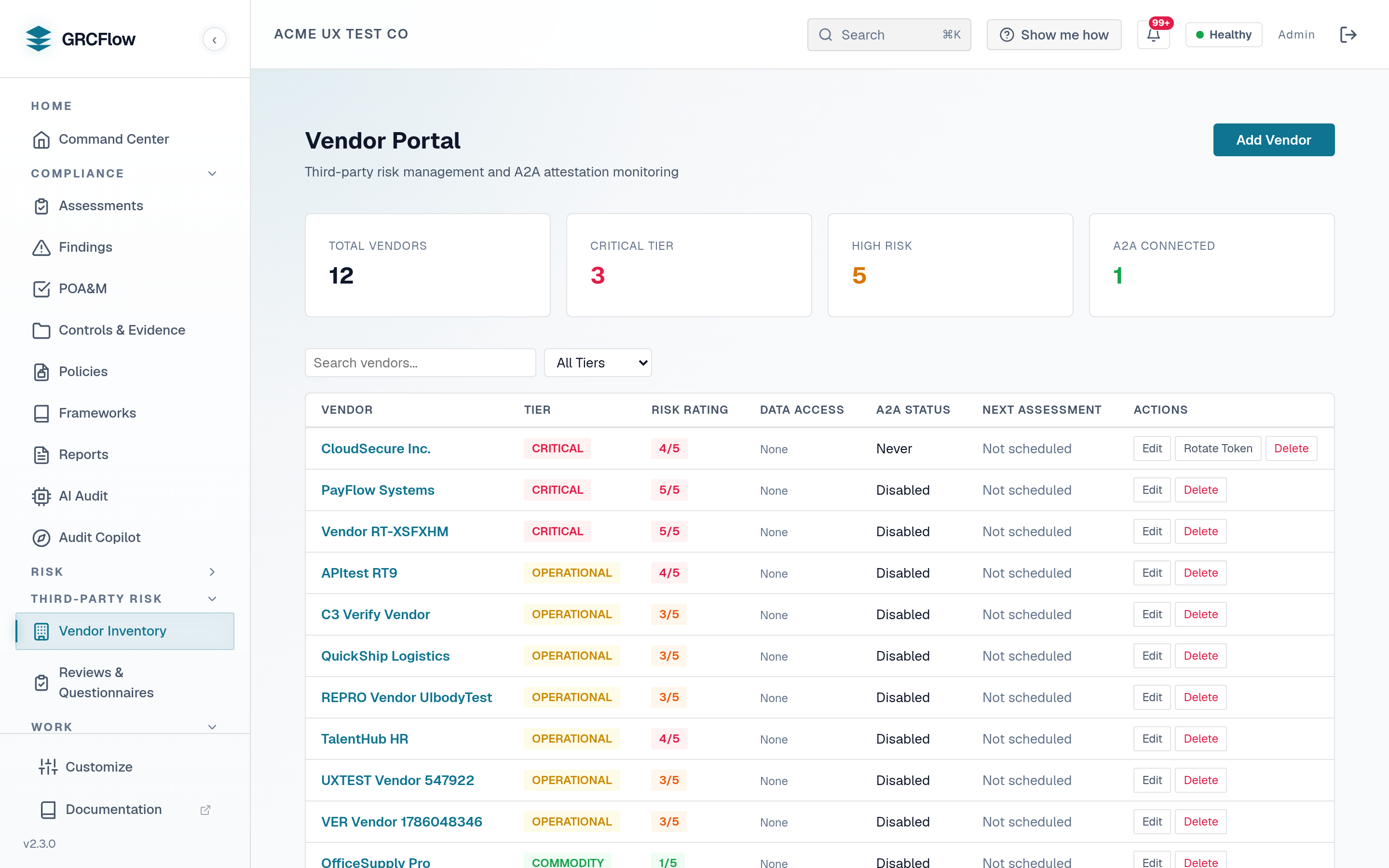
Third-party vendor risk management and Agent-to-Agent (A2A) attestation monitoring. Track vendor risk ratings, data access levels, and assessment schedules.
Key Elements
- Stats cards — Total vendors, critical tier count, high risk count, and A2A connected count.
- Search and filter — Search by name or filter by criticality tier (Strategic, Critical, Operational, Commodity).
- Vendor table — Name, tier, risk rating (1-5), data access level, A2A status, next assessment date.
- Actions — Edit, Rotate Token (for A2A vendors), Delete.
Vendor Tiers
The criticality_tier field accepts one of four values:
- Strategic — Vendors central to your business strategy or with the broadest access.
- Critical — Vendors handling sensitive data or critical operations. Assessed most frequently.
- Operational — Vendors supporting day-to-day business operations.
- Commodity — Low-risk, easily replaceable vendors. Assessed least frequently.
Assessment cadence is driven by the per-vendor assessment_frequency_days setting (default 365), not the tier itself.
How to Add a Vendor
- Click Add Vendor.
- Enter vendor name, tier classification, and contact information.
- Set the risk rating based on your vendor risk assessment.
- For A2A-capable vendors, configure attestation tokens for automated compliance data exchange.