Admin Settings
Path: /admin
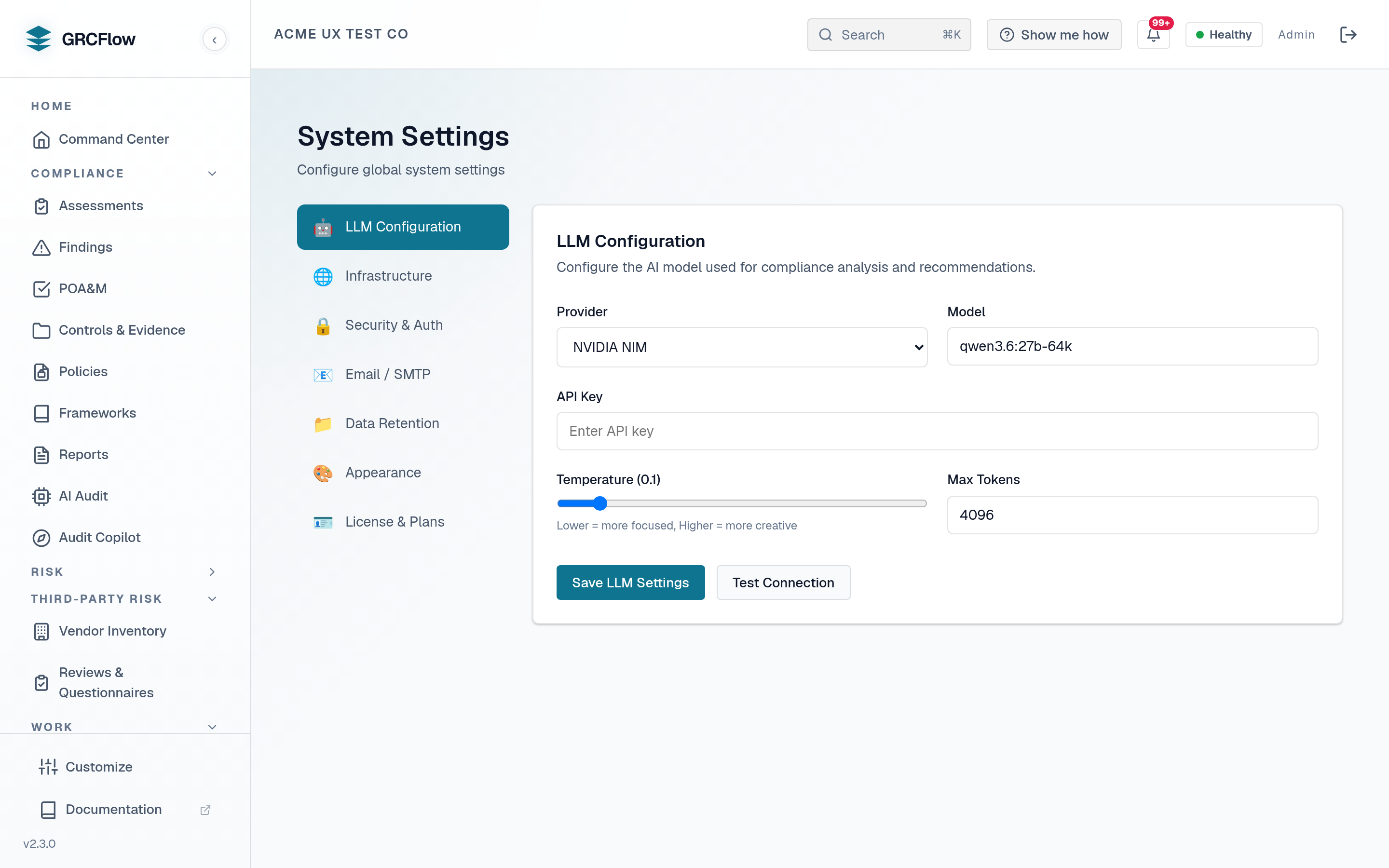
Advanced system configuration for administrators.
Configuration Sections
- LLM Configuration - Configure the AI model provider from the UI (details below).
- Infrastructure - Shows the authentication mode and Cloudflare tunnel state this installation is running with.
- Security & Auth - Password policy (minimum length and complexity) and session settings. Password policy changes apply immediately to the sign-in, invitation and password-reset pages.
- Email / SMTP - Read-only. Shows whether outbound mail is being delivered and with which provider. Outbound mail is selected from the environment, not from this tab - see Email configuration for the variables that drive delivery, the port/TLS combinations, and how to tell from the logs whether a message was sent or only logged. With no provider configured the tab says "Not delivering - messages are logged only", and invitations and password resets return a link for you to pass on instead of sending mail.
- Data Retention - How long to keep audit logs, findings, and evidence.
- Appearance - Theme (light, dark, or follow the system).
- License & Plans - View the current entitlement, and activate or update a license key without reinstalling (details below).
Database backups are not configured from this page; they are scheduled and retained
by your deployment (for example a scheduled pg_dump of the database volume; the
update script takes one before every upgrade). There is no
database reset in the product: the reset and seed endpoints exist for development
and test environments only and answer 404 everywhere else.
License
The License tab shows what this installation is actually entitled to right
now - status, plan/tier, organization, seats, deployment mode, and expiry - as
reported by the license service (the license-exempt GET /api/v1/setup/deployment-info
endpoint, so it works even when unlicensed).
Activate or update a license
Paste a signed license key into Activate or update license and click
Activate / update license. The key is verified locally against the vendor
Ed25519 public key that ships with the product (no internet required) via
POST /api/v1/setup/license, then persisted to /etc/sovereign-grc/license.key
(the license_data volume). The new entitlement takes effect immediately and the
status panel refreshes.
Use this to:
- Apply a paid key you were issued - a seat-tier key, or a legacy employee-band or Professional / Enterprise key. The setup wizard's key field is only reachable during first-run, so this tab is where post-install keys go.
- Renew before or after expiry. An expired install still lets you reach the
License tab and paste a new key - login, setup, and the health check stay
available even when GRC endpoints return
403 license_required.
A key is not optional. GRCFlow is try-and-buy: with no key activated the
install is unlicensed and every business endpoint returns 403
license_required. Every plan ships the same binaries and the full platform,
and differs only in the number of seats; each plan row on the tab names the
exact backend gate that enforces it. Air-gap is a deployment mode of the
install, included on every plan, not a plan difference. Seat limits are enforced
install-wide at user creation and invitation.
The free 1-year trial is how you open a fresh install: 1 year, 25 seats, 1 organization, the full platform and all 26 frameworks. It is a real Ed25519-signed key, requested from the form at defendflow.xyz, one per email address, shown on the page and emailed as a backup copy. No credit card is taken, so it cannot convert into a paid plan and nothing auto-renews - when it expires the API returns 403 and you decide whether to buy.
Paid keys are priced by seats - named users, not employee headcount - and are a 1-year license, prepaid, issued as an Ed25519-signed term. Every plan ships the same binaries, all 26 frameworks and the full platform; plans differ only in seat ceiling. Prices are published on the pricing page - start with the free trial or contact sales@defendflow.xyz:
| Plan | Seats | Annual price | How to buy |
|---|---|---|---|
| Flow25 | Up to 25 | $17,500 | Prepaid annual |
| Flow50 | Up to 50 | $33,750 | Prepaid annual |
| Flow100 | Up to 100 | $63,750 | Prepaid annual |
| Flow200 | Up to 200 | $118,750 | Prepaid annual |
| 201–500 seats | 201–500 | $500 / seat | Quote / invoice |
| Enterprise (500+) | 500+ | Custom quote | Quote / invoice |
Air-gapped deployment is not a separate SKU or priced tier: it is included on every plan at no extra cost, chosen by how the install is configured.
The plan's seat number is the ceiling signed into the key: Flow25 25, Flow50
50, Flow100 100, Flow200 200, and Enterprise sized to your
organization. It is the
only difference between plans that anything enforces - they all ship the full
platform and no feature is gated between them. The Seats row on
this tab shows that ceiling, because it is what require_seats_available actually
checks at invite and user creation. Size the plan to cover your members plus the
auditors, contractors and service accounts you invite.
Seats are counted locally, in the product, against the ceiling in your license claim - an install never has to phone home, so nothing here counts your headcount. On the four Flow plans, inviting or creating a user past the ceiling is refused until you free a seat or move up a plan; Enterprise carries a ceiling sized to your organization.
Keys issued under the retired plans - the earlier Starter / Team / Business seat tiers, the employee-size bands, and the per-seat Professional (25 seats) and Enterprise (100 seats) plans - stay valid to their expiry and are enforced and displayed on their original seats; a claim carrying a legacy band keeps that band's terms.
There is no auto-renew and no card kept on
file: when the year is up you buy a new key and paste it here. Validation is entirely offline -
the backend checks the signature against the vendor public key that ships in the
deployment files (LICENSE_PUBLIC_KEY_HEX in deploy/public/.env.example and as
the docker-compose default), so there is nothing for you to obtain or generate.
See Offline & air-gapped activation for air-gapped hosts
and the clock-rollback check.
LLM Configuration
The LLM Configuration tab drives the platform's AI runtime directly - saved
settings are stored in the database, override the LLM_PROVIDER environment
configuration, and apply live with no backend restart.
- Provider - dropdown selection. Providers with a runtime client in this
build:
- NVIDIA NIM - hosted models via integrate.api.nvidia.com.
- Local / Self-hosted (Ollama/vLLM) - enter the Base URL of your
server's OpenAI-compatible endpoint (e.g.
http://localhost:11434/v1for Ollama). Private and localhost addresses are allowed. - OpenAI and Azure OpenAI - served through the same OpenAI-compatible client (Azure shows a Base URL field for your resource endpoint).
- Anthropic Claude - native Messages API client.
- Google Gemini and DeepSeek - served over their OpenAI-compatible endpoints.
- Cloudflare Workers AI - hosted inference via the Workers AI client.
- Model - a list per provider plus Custom model…, which lets you type any model ID, so the list never blocks you from a newer model. For a local server and for Azure OpenAI you always type the model (or deployment) name. See Models and defaults.
- API Key - stored encrypted at rest; once saved it is shown masked and never echoed back to the browser.
- Test Connection - probes the endpoint you configured
(
POST /api/v1/system/settings/llm/test) and reports success or the exact failure, so you can validate before running an assessment. For an OpenAI-compatible endpoint (vLLM, Ollama, NVIDIA NIM) it also checks that the model name you entered is one the server serves, and fails listing the available models if it is not, so a typo is caught here rather than on the first assessment.
Models and defaults
The model lists and the model each provider starts with, as shipped in this version (the first entry is the default):
| Provider | Models in the list |
|---|---|
| NVIDIA NIM | nvidia/nemotron-3.5-super-vl-120b-a12b (recommended), nvidia/nemotron-3.5-lightning-30b-a3b (fast) |
| Anthropic Claude | claude-opus-5-5 (recommended), claude-fable-5-2, claude-sonnet-5-5, claude-haiku-5-5 |
| OpenAI | gpt-6.1-sol (recommended), gpt-6-astra, gpt-6.1-terra, gpt-6-luna |
| Google Gemini | gemini-4-hydrogen (recommended), gemini-4-carbon, gemini-4-argon, gemini-3.5-flash-lite |
| DeepSeek | deepseek-v4-pro (recommended), deepseek-flash |
| Cloudflare Workers AI | @cf/meta/llama-3.3-70b-instruct-fp8-fast (recommended), @cf/openai/gpt-oss-120b, @cf/openai/gpt-oss-20b, @cf/qwen/qwen3.8-27b |
| Local / Self-hosted, Azure OpenAI | No list: type the model your server exposes, or your Azure deployment name |
- A model the provider has retired is kept, and reported. If the model you saved is not in the list (a newer ID, one you typed, or one the provider has since withdrawn), it is shown as a custom model and is not replaced. When the provider refuses it, the reason is shown under the model picker and in system health: for a withdrawn model, "This model is no longer available from the provider. Choose another model."
- Health reflects the last real result. The AI entry in system health is not only "the provider's address answers": it reports the outcome of the most recent real request or Test Connection for the model that is configured now. A success clears an earlier failure. The message never contains an API key.
- Requests adapt to the model. When a provider rejects a request parameter the model does not support, GRCFlow resends the request without it and remembers that for the model. An error about a parameter's value is shown as it is.
- NVIDIA availability is per account. A model in NVIDIA's catalog can still be refused for your key; Test Connection is the proof. The NVIDIA default before 2.5.1 has been retired by NVIDIA.
Which providers were verified with real requests
For this version, two setups were exercised with real requests: the NVIDIA hosted API with the two models listed above, and a self-hosted OpenAI-compatible server. The request formats for Anthropic, OpenAI, Google Gemini, DeepSeek, Azure OpenAI and Cloudflare Workers AI were written from each provider's documentation and are covered by automated tests against simulated responses; they were not called with real accounts. Use Test Connection after you save.
Running a reasoning model? Set LLM_REASONING_EFFORT=none
Reasoning models - Qwen3, DeepSeek-R1, kimi-k2.5 and similar - think before they answer, and the thinking is billed against the same token budget as the reply. A model given too little room spends the whole budget reasoning and returns an empty answer, or one that stops mid-word.
GRCFlow handles this automatically: it detects the pattern, retries with the
thinking switched off and a larger budget, then remembers for the rest of
the process. You do not have to configure anything. But the first
generation in each worker process still pays for the probe, so if you
already know your model reasons, set LLM_REASONING_EFFORT=none and skip
it. Measured against a 27B reasoning model over Ollama: ~25s of discarded
thinking saved on the first call, and the same request answering in ~9s
instead of ~35s.
LLM_RETRY_MIN_TOKENS (default 4096) is the floor for the retry's budget.
Lower it only for a short-context model; your context window must
comfortably exceed the prompt plus this budget.
Anthropic, Gemini, DeepSeek and Workers AI need a key to take effect
Anthropic Claude, Google Gemini, DeepSeek and Cloudflare
Workers AI all have real runtime clients in this build
(AnthropicClient, GeminiClient, DeepSeekClient and WorkersAIClient
in src/backend/llm/client.py), and the admin-panel value routes to them
through _PROVIDER_MODE_MAP.
One deliberate guard applies: selecting Anthropic, Gemini or DeepSeek only
takes effect once a usable API key exists - either saved in the panel or
present in the environment. Without a key the saved provider is ignored and
the environment-configured provider stays authoritative, so a keyless
selection can never silently break AI features. SystemSettings.llm_provider
has always defaulted to anthropic, and this guard is what stops
long-lived installs that never configured a key from switching provider on
upgrade. See Bring Your Own Model.