Audit Trail & Integrity
Path: /audit
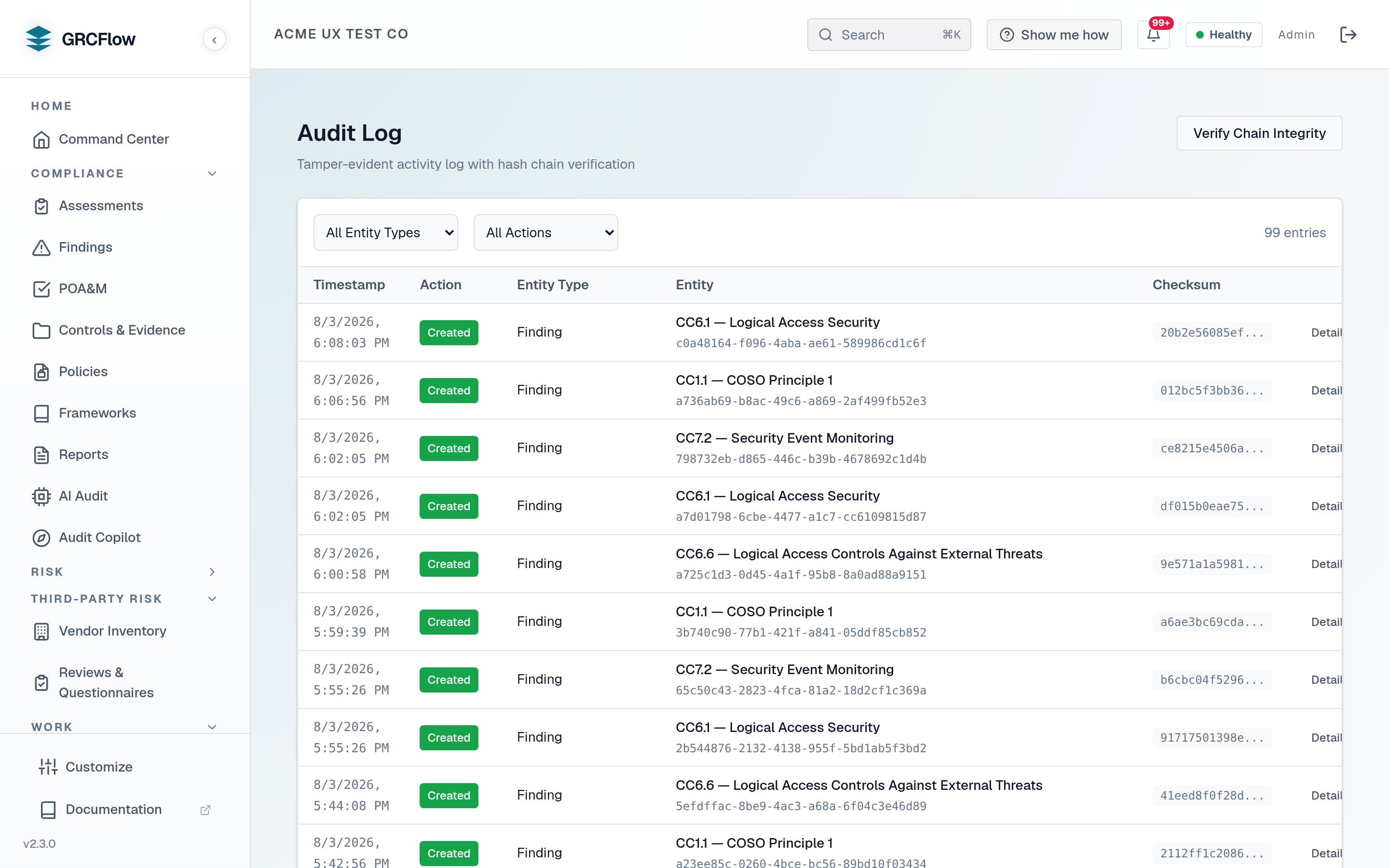
The audit trail is the platform's anti-"blinking green light" mechanism: a tamper-evident, cryptographically signed record of the state changes that matter. It answers not just "what does the dashboard say?" but "who changed it, when, and can you prove the record wasn't edited afterward?"
What gets recorded
Security-relevant mutations write through a single service-layer entry point
(record_audit_event), so there is one chaining/signing path - not a second,
weaker logging mechanism. Wired-in events include:
| Area | Recorded events |
|---|---|
| Findings / verdicts | Finding creation and updates, including verdict and disposition changes |
| Assessments | Run state transitions (including background/system transitions) and the human-review sign-off decision |
| Evidence | Evidence lifecycle changes |
| Policies | Create, update, review, approve, archive, and delete - approval is recorded as an ATTEST action signed with the approver's key |
| Risk register | Create, update, and delete (entity_type risk) - updates carry a before/after diff, and a no-op update records nothing |
| Policy versions | Snapshot ids are recorded in the chained entries, tying version history to the trail |
| Attestations | Every policy acknowledgment is a signed ATTEST entry |
| Assessments (lifecycle) | Create and delete, in addition to the run-state and sign-off transitions above |
| Findings | Create, CMMC evidence classification, and remediation text saved by the Audit Copilot, in addition to the update/review events above |
| Users | Create, update (including role change), delete, deactivate, and auto-provisioned first logins |
| Invitations | Invite, revoke, and re-issued link - the invite token/link is never recorded |
| Password resets | Admin-initiated reset (entity_type user) - the reset token/link is never recorded, only the delivery method |
| External auditors | Grant create (granted) and revoke, every evidence view by a scoped auditor, and every denied download attempt - the one-time accept token is never recorded |
| Incidents | Create, update, and delete; plus incident tasks, timeline entries, and evidence collection |
| Vendors | Vendor, assessment, and contract create/update/delete; vendor questionnaire create/send/score/review |
| Risk scenarios / KRIs | Create, update, and delete (entity_type risk_scenario and kri); risk-control mappings and manual residual overrides |
| Tasks | Create, update, assign, start, complete, block, cancel, and comment (entity_type task) |
| SOX | Certifications, RCM entries, rollover, and deficiencies - certifying is an ATTEST by the designated certifier only |
| Business continuity | Processes, dependencies, and recovery plans (bcm_*) |
| Contracts / obligations | Create, update, delete, stored-contract analysis, and obligation completion |
| Cross-compliance | Mapping create/delete and propagation (cross_compliance_mapping) |
| Regulatory | Regulations, regulatory changes and acknowledgments, semantic gaps, and control mappings |
| Competence / training | Competence create/update/delete/verify and training start (training_assignment) |
| Data-source connections | Create, update, delete, and health test (connection) - only names, provider types and the test outcome are recorded, never credentials or config secrets |
| Trust center | Settings, document uploads, and access-request approve/deny decisions (who, for which document) |
| Governance modules | Meetings, RACI, ESG, AI systems, SoD rules/controls/violations, FAIR analyses, bow-tie diagrams, analytics rules, sampling, schedules, and scheduled jobs |
| Questionnaire templates | Create, update, delete, and clone |
| Evidence intake | Evidence requests (PBC), their external ticket link/unlink/close and comments, and bulk CSV/JSON/connector imports (counts only) |
| License | Activation and replacement (entity_type license), recorded against the acting administrator's organization (the customer organization) - tier/seats/expiry of the old and new license, never the key; first-run activation (no organization yet) is logged, not recorded |
| System settings | Password-policy, security, SMTP, retention, backup, appearance, and LLM changes, recorded against the acting administrator's organization - changed key names and non-secret values only; secret values (SMTP password, LLM API key) are never recorded |
| Retention policy | Audit-log retention changes (entity_type audit_retention_policy) |
| A2A | Notification subscription create/update/delete and webhook-secret rotation - the secret is never recorded |
| API keys | Create, update, and revoke - the key material is never recorded, only its public prefix and scopes |
| Organizations | Create, update, delete, and the setup framework selection - settings values are never recorded, only which keys changed. Deleting an organization removes its own trail with it, so the deletion is recorded on the internal System organization as a system entry that names the organization and the administrator who deleted it |
| Audit export | Each export writes an EXPORT entry with the actor, format, filters, and row count (never the exported rows) |
Who performed an entry, and deleted users
Each entry stores the id of the user who acted, and that id is part of what
the entry's checksum and signature cover. The User column shows the user's
name (the API returns it as actor_name); an entry with no user is a
System action.
Deleting a user does not remove them from the trail. A user who has written
audit entries, or whom other records refer to (approvals, sign-offs,
certifications, ownership), is kept as a tombstone that holds only the id and
the name: they can no longer sign in, hold no seat, do not appear in user
lists, and their email address can be invited again. Their past entries keep
verifying and are shown as Name (deleted user) (actor_deleted is true).
The name is kept because an audit trail that cannot say who acted is not
evidence; the email address is not kept on the account, though entries that
recorded it at the time (the invitation, the deletion itself) still contain it.
A user nothing refers to is removed outright.
Users deleted before 2.3.1 were removed from the database, which cleared the user reference on the entries they had written; chain verification reports the first such entry as modified.
Secrets are never recorded
Change diffs carry names, types, and non-secret values only. Two layers enforce
this: each call site leaves credentials, tokens, keys, and invite/reset links
out of the diff, and the audit write path itself masks the value of any
secret-named key (password, token, secret, api_key, credential,
private_key, *_password, *_secret, *_token, ...) with ***REDACTED***
before the entry's checksum is computed. The masking applies to entries written
from 2.3.1 on; earlier entries are not rewritten, so their checksums and the
chain are unaffected.
What is deliberately not recorded
Requests that change nothing durable are not audit events: AI drafting and
analysis, searches, queries, validations and connection tests sent as POST,
sign-in and session endpoints (they have their own security log), public
token-based intake (invitation, auditor and vendor-portal acceptance, trust
center access requests - the decision is recorded instead), per-user read state,
and inbound ticket-system webhooks. Every state-changing route is listed as
either audited or exempt, with a reason, in
tests/unit/test_audit_coverage_inventory.py; the test fails when a new route
is neither.
How integrity works
Two independent mechanisms protect every entry:
- SHA-256 hash chain - each entry's checksum includes the previous entry's checksum, so deleting or editing any historical entry breaks the chain from that point forward. Since 2.3.1, concurrent writes are serialized per organization with a Postgres advisory lock held for the transaction, so two simultaneous writers cannot fork the chain. A chain that was broken before you upgraded stays flagged at that same entry; the upgrade does not rewrite or repair history.
- Ed25519 digital signatures - each user has their own Ed25519 key pair.
The private key is stored AES-256-GCM-encrypted under a server-held master
key (
AUDIT_SIGNING_MASTER_KEY); the signature covers the same canonical payload as the checksum. The signer's public key is stored in the entry itself, so verification is self-contained - no key lookup required.
System-generated actions (background jobs, external auditors with no user record) have no signing key; those entries are hash-chained but unsigned, and the verification endpoint reports them honestly as unsigned rather than pretending they were signed.
Failure semantics - the change and its entry, both or neither
The audit entry is written in the same database transaction as the change
it records, before that transaction commits. If the entry cannot be
written, an AUDIT TRAIL WRITE FAILED error is logged, the request fails
with a server error, and the transaction rolls back: a change is never
committed without its audit entry. The user can retry once the cause is
resolved. A signing problem does not count as a write failure: the entry is
still stored and hash-chained, and is reported as unsigned.
Who can read and export it
The audit trail is access-controlled. Browsing and verifying it (the chain and signature checks) requires an admin, compliance manager or auditor; exporting is limited to admins and auditors; changing the retention policy is admin-only. These routes reject anonymous and cross-organization callers.
Verifying the trail
GET  /api/v1/orgs/{org_id}/audit/log                 # browse entries (filters + pagination)
GET  /api/v1/orgs/{org_id}/audit/entity-types        # entity types that have entries (feeds the filter)
POST /api/v1/orgs/{org_id}/audit/verify-chain        # recompute the hash chain
POST /api/v1/orgs/{org_id}/audit/verify-signatures   # check Ed25519 signatures
GET  /api/v1/orgs/{org_id}/audit/report              # summarized audit report
GET  /api/v1/orgs/{org_id}/audit-log/export          # export entries
GET  /api/v1/orgs/{org_id}/audit-log/retention       # read/update retention policy
- Verify chain recalculates checksums over the requested date range and compares them with the stored values - any tampering (edit, delete, reorder) is detected.
- Verify signatures checks each signed entry against the public key stored in that entry and returns counts of valid, invalid, and unsigned entries. Unsigned is expected for system actions and entries predating signing.
How to use the audit log UI
- Use filters to find specific activities (e.g., all "Created" actions on "POA&M" entities). The entity-type filter lists every type that has entries in your organization's trail. There is no free-text search.
- Click Details on any entry to see the full record, including who performed the action and the change diff.
- Click Verify Chain Integrity to run the cryptographic verification.
- Admins and auditors see an Export control: pick CSV, JSON, or CEF (SIEM) and click Export to download the currently filtered range. The export carries the hash-chain checksums and signature fields so it can be verified offline, the export itself is recorded in the trail, and CSV cells are neutralized so spreadsheet-formula injection cannot execute on open.
Compliance
The hash chain plus per-user signatures support SOC 2 CC7.2 (system monitoring), ISO 27001 A.12.4 (logging and monitoring), and non-repudiation requirements for auditor sign-offs.